
How search from anywhere should work
Currently, if you want to search for a term, you open a fresh webpage and type the query. One level beyond that, you copy-paste the terms from wherever it appears. In my Alfred Workflow, I search simply by highlighting text and hitting option-?
That is, if you use Alfred and download my workflow https://github.com/noivad/alfred_workflows/releases/tag/Alfred . Alfred is a drop in replacement for the command-space text input bar, but mush more powerful. It is free for basic abilities, but for advanced things, the Powerpack is very reasonably priced. https://www.alfredapp.com/shop/ (one-time payment of ₤34 as I type this.)
This may seem like a very simple, and minor change to your workflow, but it makes a big difference when you’re working, and need to quickly look up something without breaking your rhythm. Each time you use it you shave seconds off the time it takes to search, which adds up over time. Also, once you get used to this shortcut, and the others listed in the Github release, you’ll become spoiled, and miss the feature when you use other people’s machines.
If you’re already and Alfred for MacOS user, and don’t believe me, try it out for a few weeks.
Here’s a picture of the workflow:
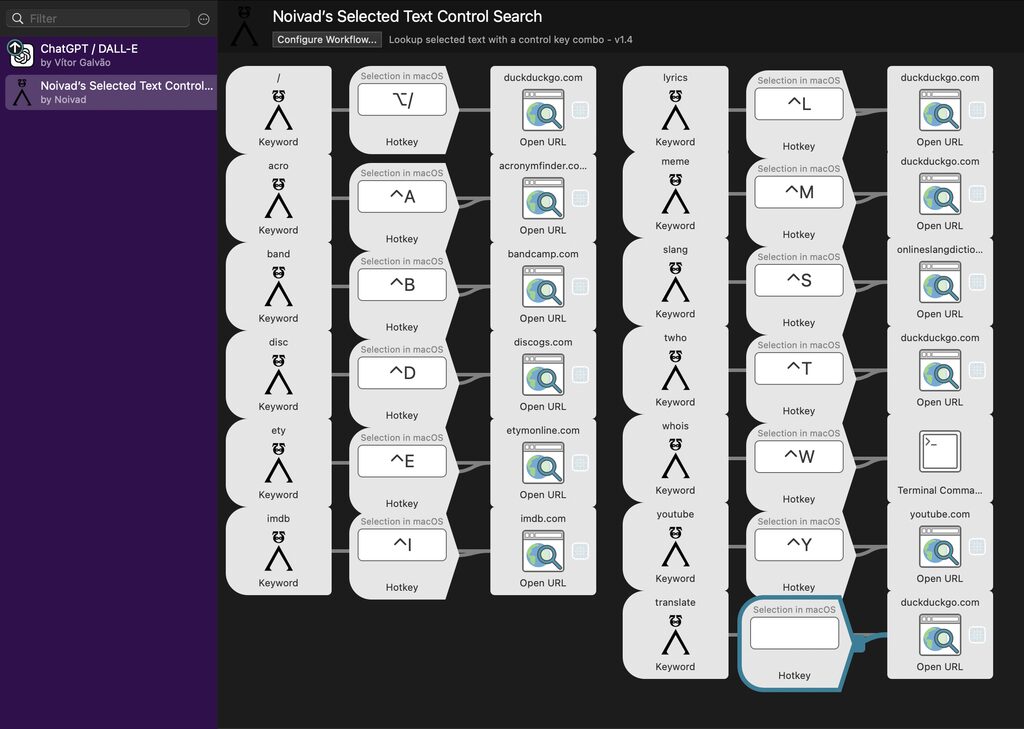
There’s really not much to this workflow. Just select and wrap the selected text in the site’s query URL replacing the search term with “{query}”, and plug in your hotkey. You can see examples by double clicking one of the “Open URL.” this is shareware $1–$10—depending on how much you feel this helps you and if you can afford it.—with no restrictions even if you don’t pay. If you want to pay, here’s my Venmo name: @Michael-R2020
Thanks for reading.